 Order Automatica
Grid Placement
Dark Tactical Roguelite Auto-Battler · 3×3 Ritual Grid
The 3×3 Ritual Grid
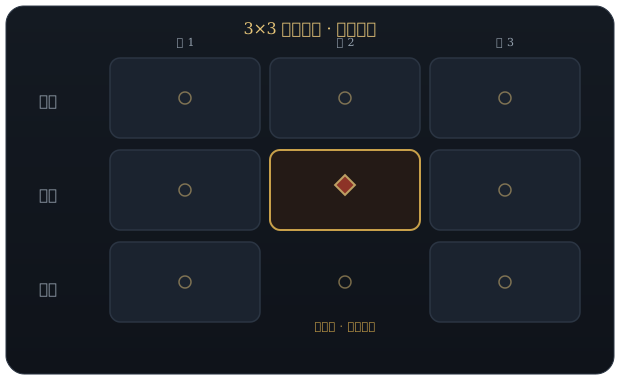
Combat takes place on a ritual grid of 3×3 = 9 cells. Units occupy cells; a unit's cell determines its front/mid/back relationship and which adjacent synergies it can trigger. Knowing ‘who goes in which cell’ separates veterans from beginners.
Which units fill those cells is the other half of the equation — see the Unit Compendium for the full roster with base stats, and Unit Synergy for the 34 ability triggers that decide what adjacency actually does once the fight starts.

Rows & Engagement Order
The 3×3 grid holds at most six units (you don't have to fill all six slots). Rows map to engagement order, so "where" matters as much as "who":
- Front row (bottom three cells) — engages the enemy frontline first. High-health tanks and melee attackers belong here; they soak damage so your back line survives.
- Middle row (center three cells) — the support layer, it activates after the front row engages. Synergy-activating units, buffers and secondary damage dealers fit best in the middle.
- Back row (top three cells) — your ranged and highest-value units, attacking from a protected position. They're exposed the moment your frontline collapses, so only park fragile power units here when the front is sturdy.
New to positioning? The Beginner’s Guide covers the same front / mid / back row logic along with the five placement mistakes beginners make most often.
Source: GAMESCENSOR Beginner's Guide.
Tile Effects & Manipulation
You can manipulate tiles on the ritual grid: specific cell effects change a unit's behavior depending on its grid position, adding a layer of strategy beyond raw placement. At launch the grid ships 18 tile effects across buff / debuff / trigger categories — pairing the right unit type with the right tile is part of advanced play. The mechanic is confirmed pre-launch; exact tile names and values are not yet public.
Confirmed split (official): the 18 Cell Effects are exactly 9 positive + 9 negative cells — half help you, half hurt you, so tile control is a real tug-of-war. Source: Steam Community announcements (unit/item data).
Recovered from the demo client (AppID 2577030) — these are the real tile-effect names and mechanics, surfaced via the game's own localization keys. Display names are derived from the localization keys (the demo ships only key slugs locally; exact capitalization may shift at launch). Official total is 18 Cell Effects (9 positive + 9 negative); we recovered 16 named + 19 described effects.
Named Tile Effects
| Tile Effect |
|---|
| Attack |
| Copy Highest Attack |
| Copy Highest Defense |
| Copy Item |
| Death at Start of Battle |
| Double Damage |
| Gain Item |
| Health and Defense |
| Health at Start of Battle |
| Iron Helmet |
| Level Up |
| No Buffs |
| Red Cauldron |
| Send to Enemy Grid |
| Special Ability |
| Trigger Items |
Tile Effect Mechanics
| Mechanic |
|---|
| Cell Lock |
| Copies Items Column |
| Copy Highest Attack |
| Destroy Items |
| Die at Start of Battle |
| Do Special Ability at End of First Round |
| Double Damage |
| Gain or Replace Item at End of First Round |
| Get 3 Items |
| Imp |
| Level Up 1 at Start of Battle |
| Negate Special Ability |
| No Buffs |
| Plus4 at Start of Battle |
| Plus6 Attack at Start of Battle |
| Plus6 Health at Start of Battle |
| Reduce Attack |
| Send to Enemy Grid |
| Trigger Items |
Source: Steam demo client datamine (Steam Store Page, demo store page).
Sources: GAMESCENSOR Beginner's Guide · Steam Store Page · Steam Community announcements (unit/item data).
Tile control is a build decision as much as a placement one: Best Builds shows how to score a roster against the grid, and the negative half of the tile pool overlaps with what the Curse system throws back at you.
Why Cell 5 (the Centre) Decides Most Fights
The grid's nine cells are numbered, and the demo client's own data shows the numbering is not cosmetic — a whole family of abilities is keyed to specific cells rather than to adjacency. Cell 5 is the centre, cells 1 and 9 are opposite corners, and the ability list recovered from the build includes entries that read Buff Cell 1, Cell 5 Buff, Buff Cell 5 Ally Equally and Buff Cell 9 alongside Attack Random From Cell 5.
The tactical consequence is that the centre cell is contested. Unlike a corner, cell 5 is adjacent to all four edge cells, so a unit placed there both receives and feeds the widest set of adjacency triggers. If your roster contains a unit whose value comes from being buffed by neighbours — most support pieces do — the centre is where it pays off. Conversely, if you are holding a fragile carry, the corners are the safer parking spot precisely because fewer triggers reach them.
The demo also carries a Swap Spots with Unit in Matching Cell ability, which means placement is not always final within a fight. Treat the board as a live puzzle rather than a one-time setup: the trigger reference lists the 34 trigger conditions the build ships, and several of them only make sense once you know which cell number your unit is standing on.
Cell-number semantics recovered from the demo client's ability keys (AppID 2577030). The numbers themselves are ours to infer from the key names — the game does not display them as a numbered overlay as far as we can tell, so treat this as a mental model, not a UI feature.
Common Placement Trade-offs
Most grid decisions are one of four recurring trade-offs. Naming them makes the board much easier to read under time pressure:
- Concentrate or spread? Stacking units around one corner maximises adjacency triggers but leaves the rest of the board empty — fine if your comp is one dense synergy chain, risky if enemies punish clumping. Spreading trades raw trigger count for board coverage.
- Protect the carry or feed the engine? Putting your strongest unit in the back row keeps it alive but may starve it of the adjacent buffs it needs to actually close the fight. When in doubt, check whether its value comes from base stats (protect it) or from triggers (feed it).
- Fill all six slots? The grid holds at most six units and you are never obliged to fill it. An empty slot costs you nothing, whereas a filler unit that occupies a good cell and contributes no trigger is actively worse than emptiness.
- Take the good tile or the good position? When a beneficial tile effect sits in a bad row, the row usually wins — engagement order decides whether a unit survives to use its buff at all. This is the one beginners most often get backwards.
Ready-made boards that resolve these trade-offs are collected on the Team Comps page, and the Best Builds framework explains how to score any arrangement you come up with yourself.